Every serious OSINT investigation ends up as a graph. A company leads to its directors, a director to a phone number, the phone number to a second company, and that second company to a website that shares a server with fifteen others. Lists and spreadsheets can't show that. A link chart can.
That is why "graph tools" have become the core of professional OSINT work. But they are not all built for the same job. Some are blank canvases where you bring your own data. Others collect data automatically. Some are built for police units, others for security teams or compliance departments.
In this article we compare the best-known all-in-one graph tools for OSINT investigations: Maltego, ShadowDragon Horizon, SpiderFoot, Social Links Crimewall, i2 Analyst's Notebook and Lampyre. We are also honest about where our own platform, Osentix, fits in, and where it doesn't.
What makes a good OSINT graph tool?
Before comparing tools, it helps to agree on what actually matters in day-to-day work:
- Data, not just drawing. A graph is only as good as what you can put into it. Does the tool find data for you (registers, domains, social media, crypto, breaches), or do you have to import everything yourself?
- Speed to first insight. How many clicks does it take from a single seed (an email, a company name, a domain) to a useful picture?
- Assessment, not only collection. Does the tool tell you what is suspicious, or does it give you 400 nodes and leave the rest to you?
- Learning curve. Can an analyst use it after a day, or does it need a week of training?
- Reporting and evidence. Can you turn the graph into something a manager, a court or a compliance file can use?
- Deployment and price. Desktop or browser, cloud or on-premise, published prices or "contact sales".
Maltego: the industry standard
Maltego is the tool most people think of when they hear "OSINT graph". It has been around since 2008 and has shaped how a whole generation of analysts works: you place an entity on the canvas (a domain, a person, an email address) and run Transforms on it, small queries that return connected entities. The official image below shows the typical result: entities on a canvas, connected by the output of transforms.

Strengths
- Huge ecosystem. Through the Transform Hub, dozens of data providers plug into Maltego, from passive DNS to social media and commercial people-search databases.
- Very flexible. You can model almost anything, and power users can write their own transforms.
- Large community, many tutorials, and a de facto standard in training courses.
Weaknesses
- Steep learning curve. Maltego is powerful, but new users often end up with huge, unreadable graphs.
- The paid plans include a lot of built-in data, but some premium Transform Hub sources still need their own subscription.
- Maltego shows connections, but judging which ones are actually suspicious is largely left to the analyst.
Pricing: The free Basic plan includes Maltego Graph (Community Edition) and 200 credits (1,000 credits with Basic+ for business and government users). Entry costs €3,000 per year with 10,000 credits. Professional costs €7,500 per year, billed per seat for up to 5 users, with 20,000 or 40,000 credits and out-of-the-box commercial data. Teams of 5 or more get a quote-based Enterprise plan. Besides the desktop client, Maltego now also offers a browser version with an AI assistant.
Best for: experienced analysts and teams that want maximum flexibility and are willing to invest in training and data subscriptions.
ShadowDragon Horizon: built for identity investigations
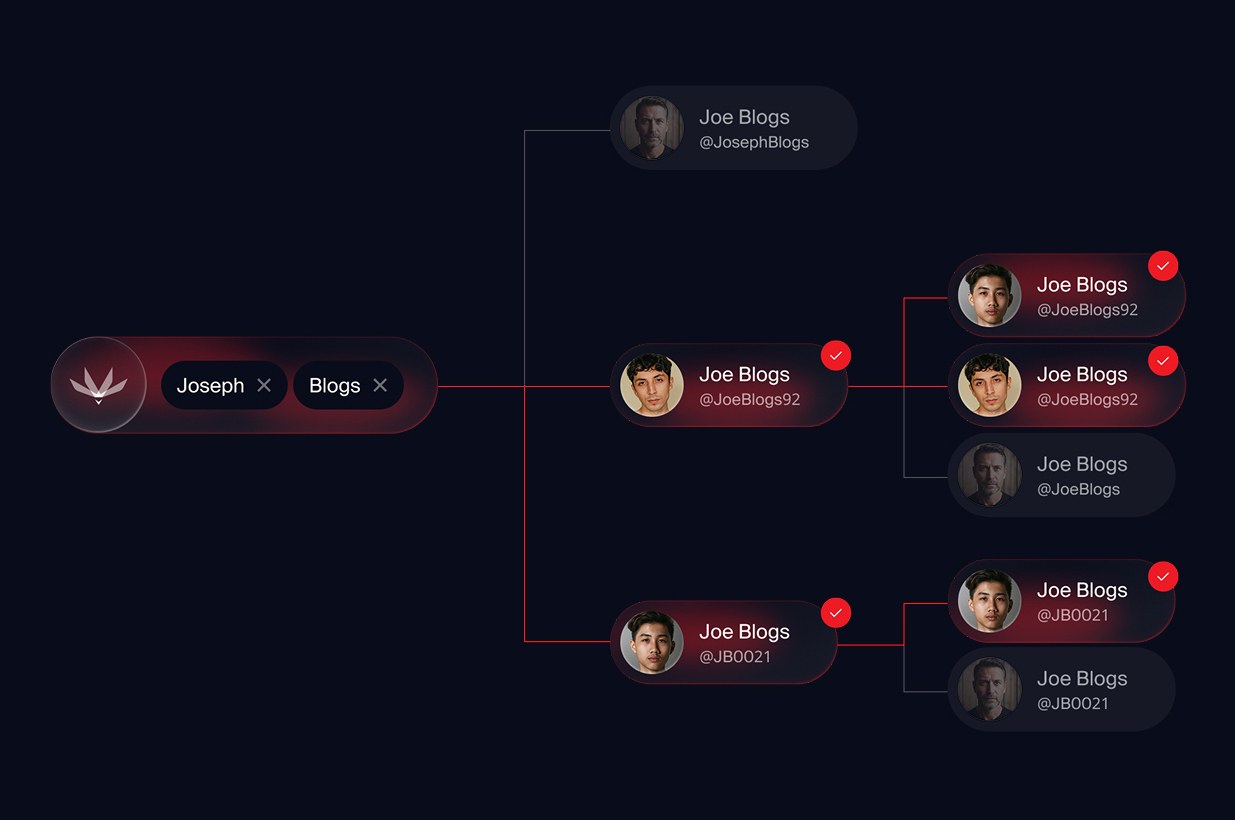
ShadowDragon is best known for SocialNet, a data engine that searches more than 220 sources, mostly social networks, forums and communication platforms. For years SocialNet was used mainly as a data source inside Maltego. With Horizon, ShadowDragon now has its own browser-based analysis platform, with add-ons for monitoring, location data and breach data. As the official illustration shows, a single username search fans out into matching accounts across platforms.
Strengths
- Very strong at finding people and accounts across many platforms from a username, email address or phone number.
- Browser-based, so there is nothing to install.
- Monitoring features to watch accounts over time.
Weaknesses
- The focus is clearly on people and social media. Company registers, corporate structures and financial data play a smaller role.
- Prices are not published, and the product is aimed at government agencies and large organisations.
Best for: law enforcement, threat intelligence and trust & safety teams whose main question is "who is behind this account?".
SpiderFoot: automated reconnaissance, open source
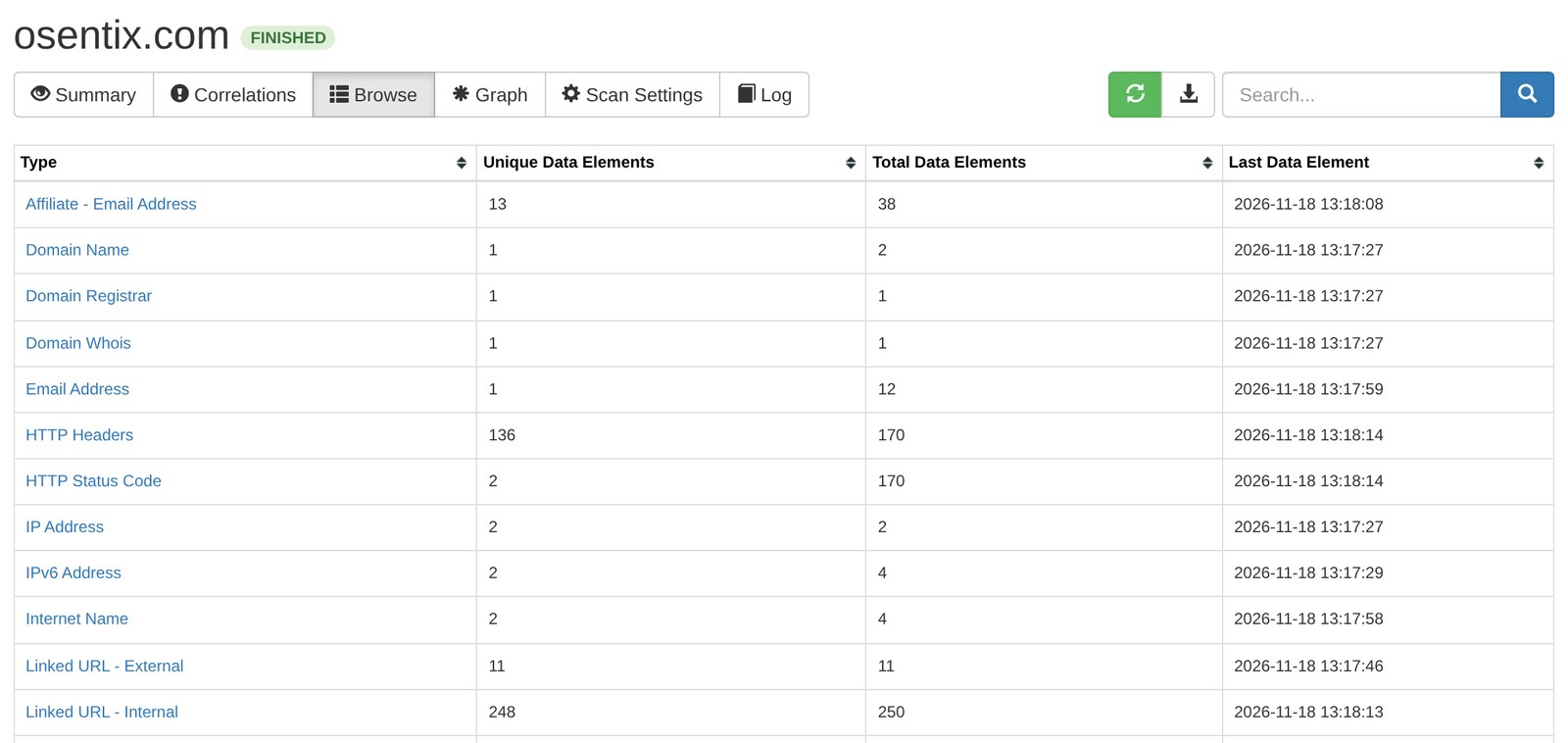
SpiderFoot takes a different approach. Instead of expanding a graph by hand, you give it a target, such as a domain, an IP address, an email or a name, and it runs more than 200 modules automatically. The result is a large set of findings that you can browse as a table or a graph.
Strengths
- The open source version is free (MIT licence) and can be self-hosted.
- Very good for attack surface mapping: subdomains, leaked credentials, exposed services, related infrastructure.
- Fully automatic, so it is good for a broad first sweep.
Weaknesses
- Since Intel 471 acquired SpiderFoot in 2022, development has shifted to the commercial version, SpiderFoot HX. The open source project has seen little activity in recent years.
- The graph view is a by-product, not the centre of the tool. Large scans produce a lot of noise.
- Little support for company, person or financial investigations.
Best for: security teams and penetration testers who want a free, automated overview of an organisation's digital footprint.
Social Links Crimewall: the full investigation cycle
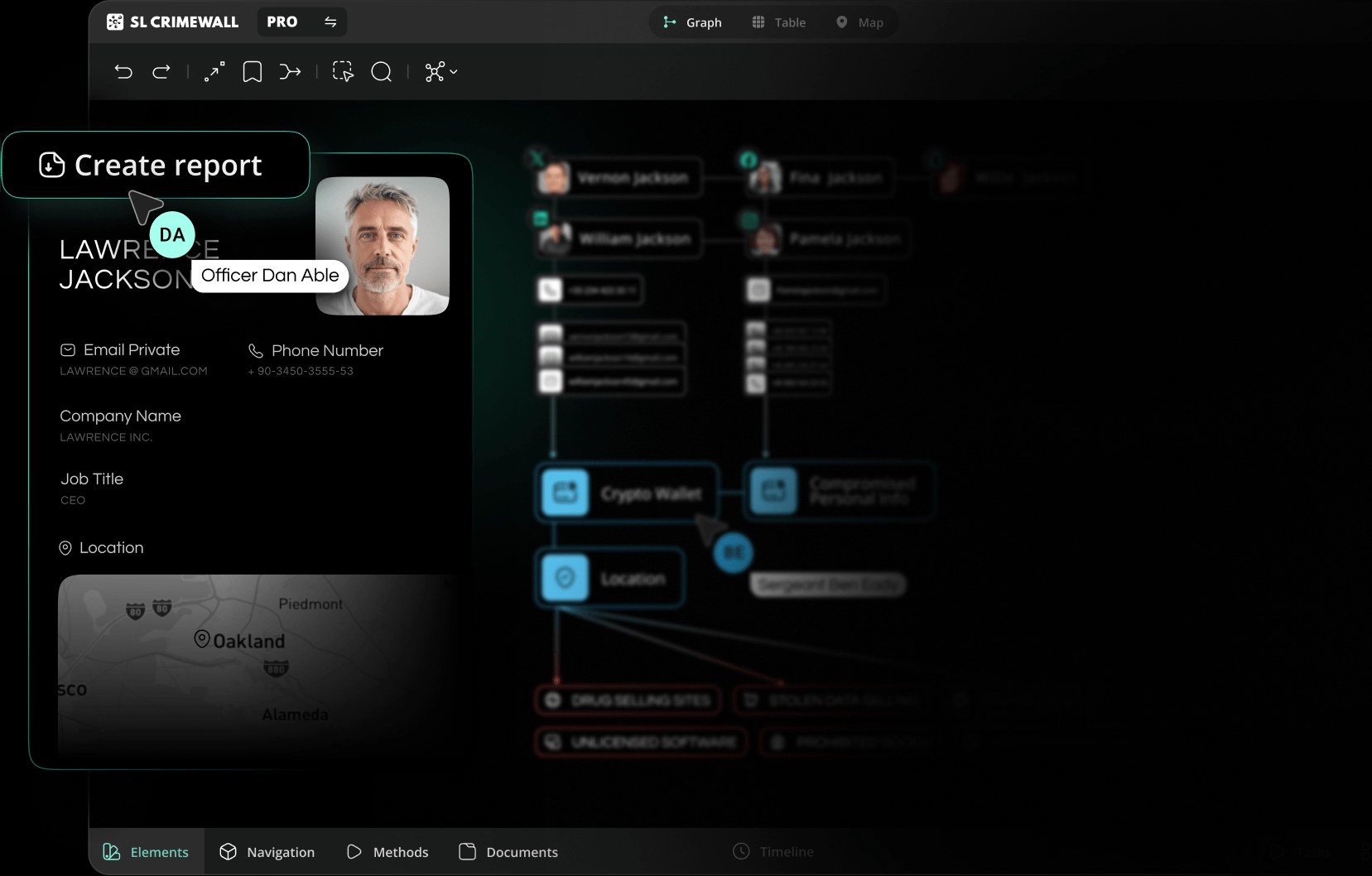
Social Links started as a data provider for Maltego (SL Professional) and now offers its own platform, Crimewall. It covers the whole process: data collection from 850+ open sources, graph analysis, case management and reporting. It can be deployed in the cloud, as a hybrid or fully on-premise, and it also offers an API. The product image below shows a person profile, the graph and the report function side by side.
Strengths
- Broad source coverage, especially social media and messengers.
- Case management and collaboration built in.
- On-premise deployment for organisations with strict data rules.
Weaknesses
- Quote-based pricing, clearly aimed at large public-sector and enterprise customers.
- Like most tools in this class, it has a significant learning curve.
Best for: investigation units in law enforcement and large corporates that want one platform from collection to court report.
i2 Analyst's Notebook: the classic link chart
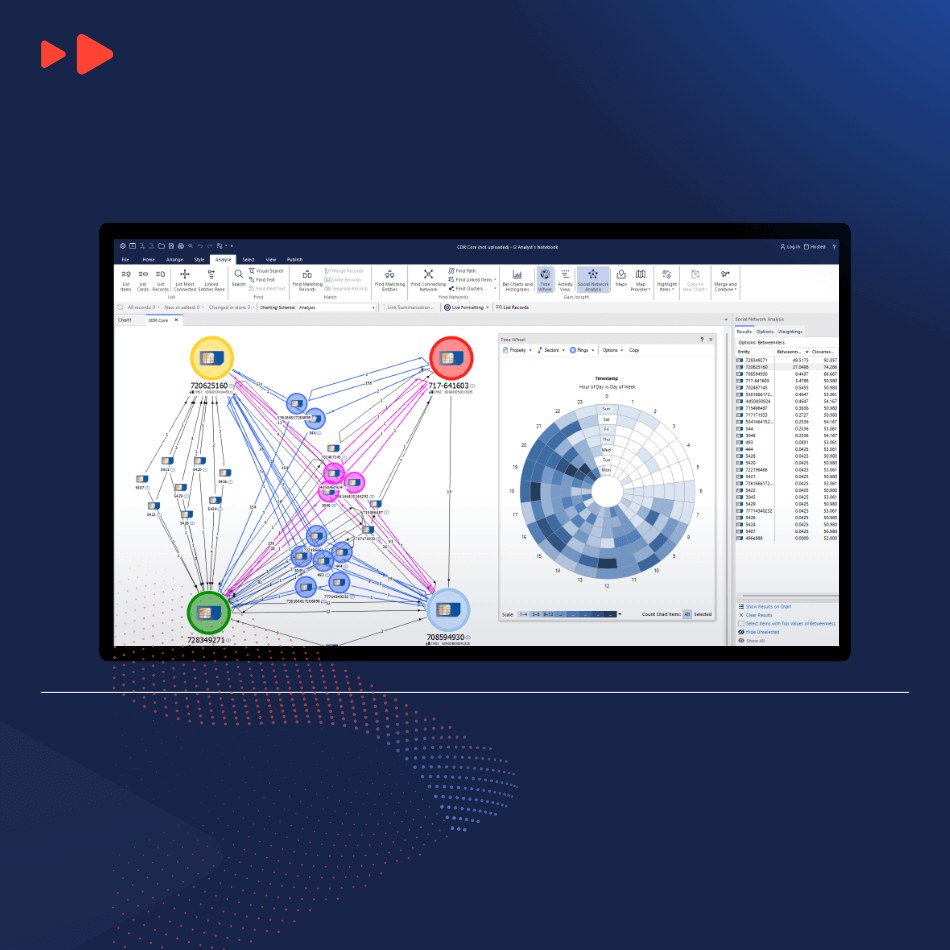
i2 Analyst's Notebook has been the reference for link analysis in police and intelligence work for decades. Its charts are what many people picture when they think of a "crime board". Today it belongs to N. Harris Computer Corporation. The official screenshot shows what it is known for: dense link charts with grouped entities and connections.
Strengths
- Excellent for visualising and presenting complex cases: timelines, link charts and network analysis.
- Established in courts and public authorities. Its charts are widely accepted as evidence presentations.
Weaknesses
- i2 is mainly an analysis and visualisation tool. It does not collect OSINT data by itself. Data has to be imported or connected through other products.
- Windows desktop software with a traditional, complex interface.
- Pricing is quote-based. There are four plans: Core, Collaborate, Connect and Pro.
Best for: analysts in police and intelligence work who already have their data and need the strongest tool to analyse and present it.
Lampyre: affordable entry point
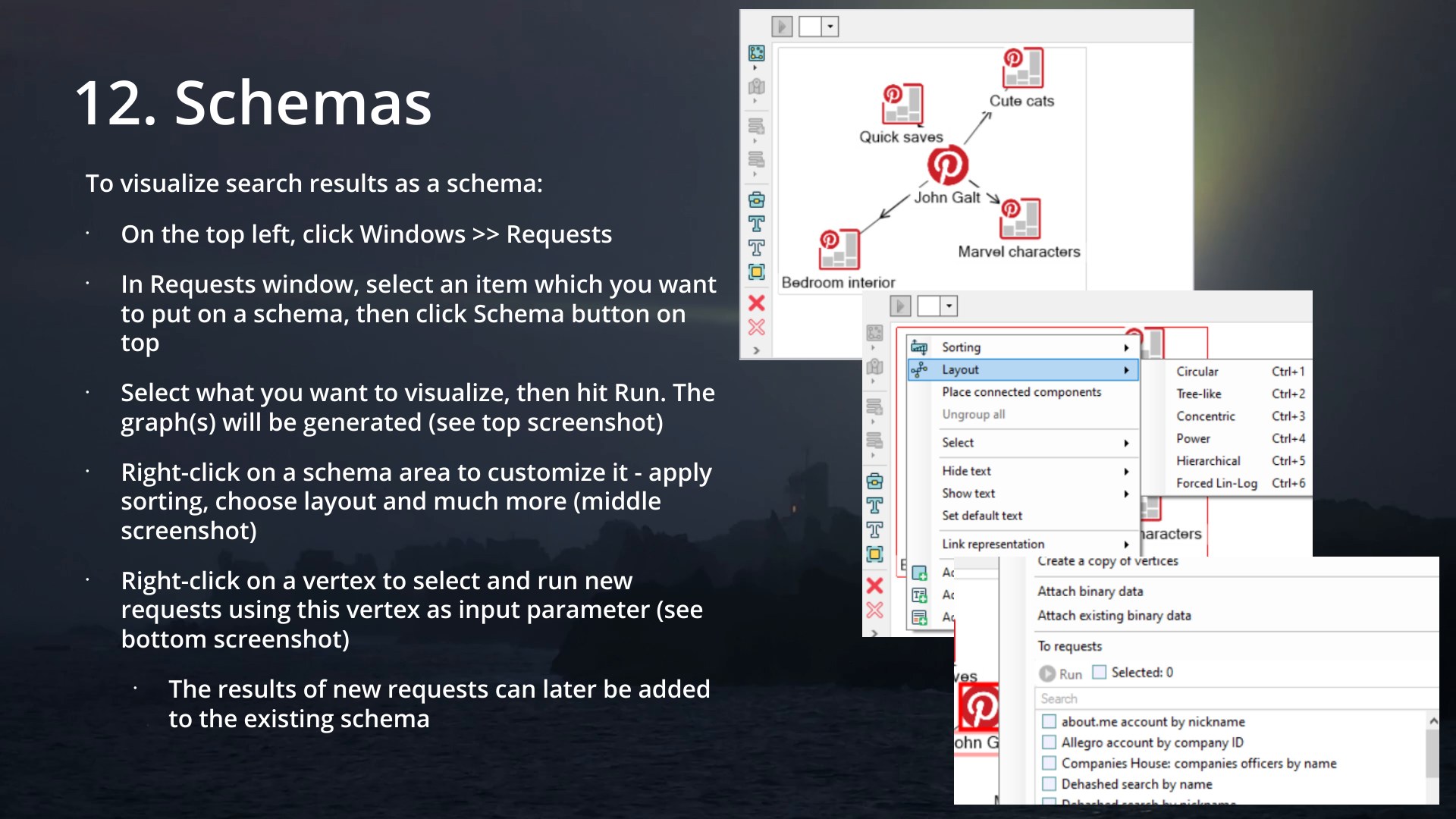
Lampyre is available as a Windows desktop application and as a web version, with a graph, maps and tables, plus a catalogue of built-in data requests for people, companies, domains and phone numbers. It uses credit-based pricing and is noticeably cheaper than the enterprise tools in this list. The page from Lampyre's own quick start guide below shows its "schema" view, where search results are displayed as a graph.
Strengths
- Low entry price: credits from $8 per month, a desktop licence from $116 per month, and a $5 trial.
- Many data requests are included, so you don't need separate subscriptions.
Weaknesses
- Data quality and depth vary from source to source.
- Less suitable for large teams and formal compliance processes.
Best for: freelance investigators, journalists and small teams on a budget.
Comparison at a glance
| Tool | Platform | Own data collection | Main focus | Blockchain analysis | Pricing |
|---|---|---|---|---|---|
| Maltego | Desktop and browser | Yes, built-in OSINT and commercial data (credits), plus Transform Hub | Flexible all-round investigations | Via Transform Hub partners (e.g. Crystal Intelligence) | Basic: free (200 credits). Entry: €3,000/year. Professional: €7,500/year per seat (up to 5 users). Enterprise: on request |
| ShadowDragon Horizon | Browser | Yes, 220+ sources (SocialNet) | People, accounts, social media | Not a focus | On request |
| SpiderFoot | Self-hosted / cloud (HX) | Yes, 200+ automated modules | Attack surface, infrastructure | Basic Bitcoin and Ethereum lookups | Open source free; HX on request |
| Social Links Crimewall | Cloud, hybrid or on-premise | Yes, 850+ sources | Full investigation cycle, law enforcement | Yes, links blockchain activity to real-world actors | On request |
| i2 Analyst's Notebook | Windows desktop | No, import or connected products | Link analysis and presentation | Via connectors (e.g. Chainalysis API) | On request (plans: Core, Collaborate, Connect, Pro) |
| Lampyre | Windows desktop and web | Yes, built-in requests | Budget all-rounder | Crypto address lookups | From $8/month (credits); desktop licence from $116/month or $807/year |
| Osentix | Browser | Yes, own database (300M+ companies, 350M+ domains) | All-in-one: OSINT, due diligence, crypto, AI investigations | Yes, 10 chains fully indexed, wallet clustering | Demo on request |
Prices are based on public listings and vendor information as of November 2026 and can change. Always ask the vendor for a current quote.
The gap we kept running into
All of these tools are good at collecting and showing connections. In our work with compliance and fraud teams, we kept seeing the same problem: the graph shows that things are connected, but not whether it matters.
A typical example: a company is registered in Canada. No sanctions, no PEP hits, no insolvency. A classic check would pass it. In the graph, its website has eight team members, each with a portrait. Any of the tools above could show you those eight nodes. The question that decides the case is whether these people exist. That means checking whether the portraits are AI-generated, whether the same faces appear on unrelated websites, how old the domain is and who actually operates it.
That is the kind of question Osentix is built for.
Where Osentix fits in
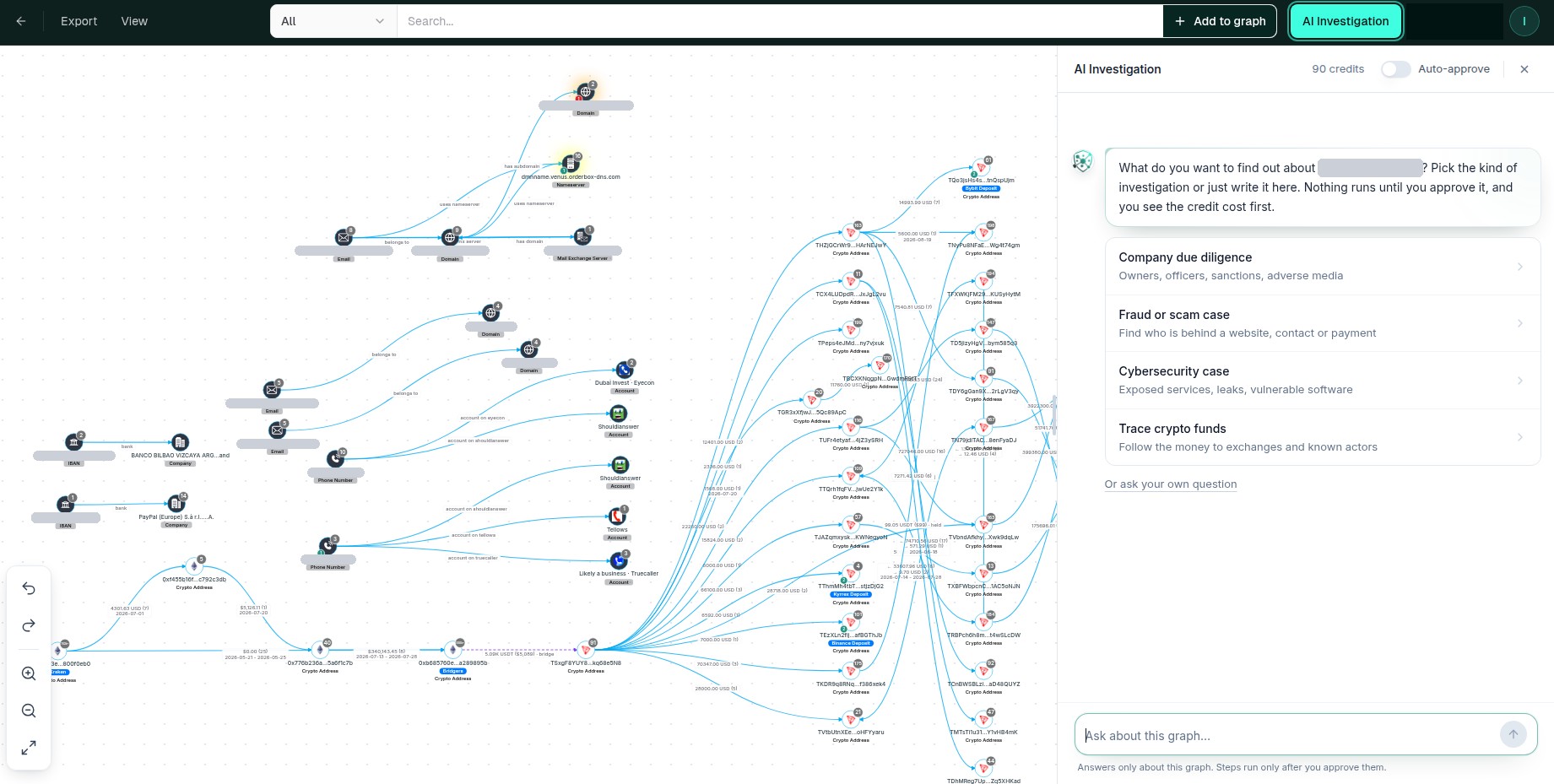
Osentix is an all-in-one investigation platform with an AI-first approach. It combines OSINT, company due diligence and blockchain analysis in one graph, and it runs on its own data instead of a patchwork of third-party transforms.
Our own database
Companies, people, web infrastructure and blockchains sit in one database, joined by more than 8 billion connections. That is why a single search reaches across all of them:
- 300M+ companies from registers worldwide, with officers, shareholders and owners. 49 countries have more than 100,000 companies each.
- 220M+ people: directors, owners and other people of record, linked to their companies.
- 350M+ domains, linked to their certificates, hosting and tracking IDs, plus 35M+ website fingerprints (analytics, ad and verification IDs) that tie separate websites to one operator.
- 10 blockchains indexed in full: Bitcoin, Ethereum, Tron, BNB Chain, Polygon, Arbitrum, Base, Optimism, Avalanche and Linea. That covers 3.5B+ crypto addresses, 450M+ labelled addresses (exchanges, mixers, scams, sanctioned wallets) and 19B+ transaction links.
AI that runs the investigation
AI-first means more than a chat window. An AI agent can run an investigation on its own: it starts from a seed such as a company, a domain, an email address or a wallet, picks the next useful steps, expands the graph and highlights what is suspicious. Analysts review and steer the result instead of clicking through every lookup by hand.
OSINT and blockchain analysis in one tool
- Enrich emails, usernames, people and phone numbers and find the social media accounts behind them.
- Find related websites through shared servers, certificates, analytics and tracking IDs, so a single scam site leads to the whole network behind it.
- Check companies against registers, officers, ownership chains, sanctions and regulator warnings.
- Run in-depth blockchain analysis: trace flows across chains, cluster related wallets, label counterparties and follow cash-outs to exchanges.
- Assess risk automatically. Every node gets a risk score with clear risk factors, for example AI-generated team photos, lookalike domains or wallets linked to fraud.
A detailed report at the push of a button
When the investigation is done, Osentix exports a detailed, automatically generated report covering every entity, finding and risk factor. That makes it ready for a compliance file, a client or a law enforcement referral.
Looking for a Maltego alternative?
"Maltego alternative" is one of the most common searches in OSINT, and the right answer depends on why you want to switch:
- Free and automated: SpiderFoot covers a broad first sweep of domains, IPs and email addresses, but it does not replace Maltego's interactive graph.
- Cheaper with a graph: Lampyre is the closest like-for-like option at a lower price.
- Enterprise and public sector: Social Links Crimewall and ShadowDragon Horizon offer their own platforms with large source catalogues.
- Own data, AI and blockchain in one tool: Osentix, if you don't want to buy and connect separate data subscriptions.
- Graph only: Gephi, Neo4j or OpenCTI are strong for modelling and visualising, but they don't collect data. You have to bring it yourself.
Which tool should you choose?
- You want maximum flexibility and have experienced analysts: Maltego.
- You investigate people and online accounts, mostly in the public sector: ShadowDragon Horizon or Social Links Crimewall.
- You need a free, automated overview of an organisation's attack surface: SpiderFoot.
- You already have the data and need to analyse and present it: i2 Analyst's Notebook.
- You have a small budget: Lampyre or Maltego's free Basic plan.
- You want one tool for OSINT, company checks and blockchain analysis, with AI that runs investigations and writes the report: Osentix.
In practice, many teams combine tools. The question is not which tool has the most data sources. It is which tool gets your analysts from a single seed to a sound decision in the shortest time.
Frequently asked questions
Is Maltego free?
Yes, with limits. The free Basic plan includes Maltego Graph (Community Edition) and 200 credits per month, requires registration and returns a limited number of results per transform. Business and government users can get Basic+ with 1,000 credits. Paid plans start at €3,000 per year (Entry); Professional costs €7,500 per year per seat.
What is the best Maltego alternative?
It depends on the job. SpiderFoot is the best-known free option for automated reconnaissance. Lampyre is a cheaper tool with a graph. Social Links Crimewall and ShadowDragon Horizon target large public-sector teams. Osentix combines its own data, AI-run investigations and blockchain analysis in one tool.
Do I need a paid OSINT tool?
For quick checks of domains, metadata or reputation, free tools are often enough. As soon as you need company registers from many countries, wallet clustering and attribution, or documented results for a compliance file, paid tools save a lot of time and give you data that free tools don't have.
Is OSINT legal under the GDPR?
Collecting publicly available information is generally lawful, but the GDPR still applies once you process personal data. Most organisations rely on legitimate interest (Art. 6(1)(f) GDPR) as their legal basis. They should document the purpose of each investigation, collect only what they need, and choose tools whose data sources and storage they can explain. This is not legal advice; check the details with your data protection officer.
Which OSINT tool is best for crypto investigations?
Most general OSINT tools only look up single crypto addresses or depend on add-ons. Real tracing needs indexed blockchains, wallet clustering and labels for exchanges, mixers and scams. Osentix indexes 10 blockchains in full and links wallets to companies, websites and people in the same graph.
Which OSINT graph tool is easiest for beginners?
Tools that load data automatically are easier to start with than tools where you pick every query by hand. Maltego is powerful but has a steep learning curve. SpiderFoot runs on its own but produces a lot of noise. In Osentix, an AI agent can run the first steps of an investigation and explain what it found.
Can OSINT results be used as evidence?
Only if they are traceable. Record where each piece of information came from and when it was collected, and export the result in a structured report. i2 Analyst's Notebook is established for presenting charts in court. Osentix exports every node and every graph as a detailed report for compliance files and referrals.
Want to see how Osentix handles one of your own cases? Book a demo.